
One-click fixes and one screen for your Windows computers
Know what your Windows computers are doing.
365 IT Guard puts a small app on each Windows computer. It fixes everyday problems with one click, checks that the computer is protected, and shows you which computers need attention.
Built for Windows. Windows 10 and 11.
14-day free trial, no credit card. US customers only for now.
Choose your path
Home & family
My own PC, and the ones I look after for family and friends.
One-click fixes when something goes wrong, a check that each computer is protected, and one place to see every computer in the house.
Small business
The Windows computers your business runs on, with nobody on staff to look after them.
One screen showing which computers are protected, healthy, or need attention, and one-click fixes your staff can run themselves.
Looking after a parent’s laptop or the family PC counts as Home & family. Choose Small business for computers used for work.
Nobody, including you or us, can run anything on a computer from somewhere else.
01The problem
Nobody has a current answer.
Which computers do you actually have, and is that one protected? Whether it is four computers at home or 5 to 25 at work, most people cannot answer either without going and looking.
Until there is an answer, every small problem becomes somebody else’s problem, and you find out something is wrong when someone can’t work.
02What it does
Three jobs, whoever you are.
The product is the same in both tracks. What changes is how many computers you are looking after.
01
Fixes the everyday problems
One click to clear out temporary files, stop programs opening at sign-in, close programs that say "Not responding", bring back a frozen taskbar or Start menu, run a virus scan. Nothing changes until the person at the computer says yes.
02
Shows which computers need attention
Every computer gets a health score. If something’s wrong, it’s in red, with what’s wrong and the fix.
03
Checks every computer is protected
It checks your antivirus and firewall, whether that’s Microsoft Defender or another product like ESET.
03What it looks like
Two screens, and that is the product.
One for whoever is at the computer, one for whoever looks after it.
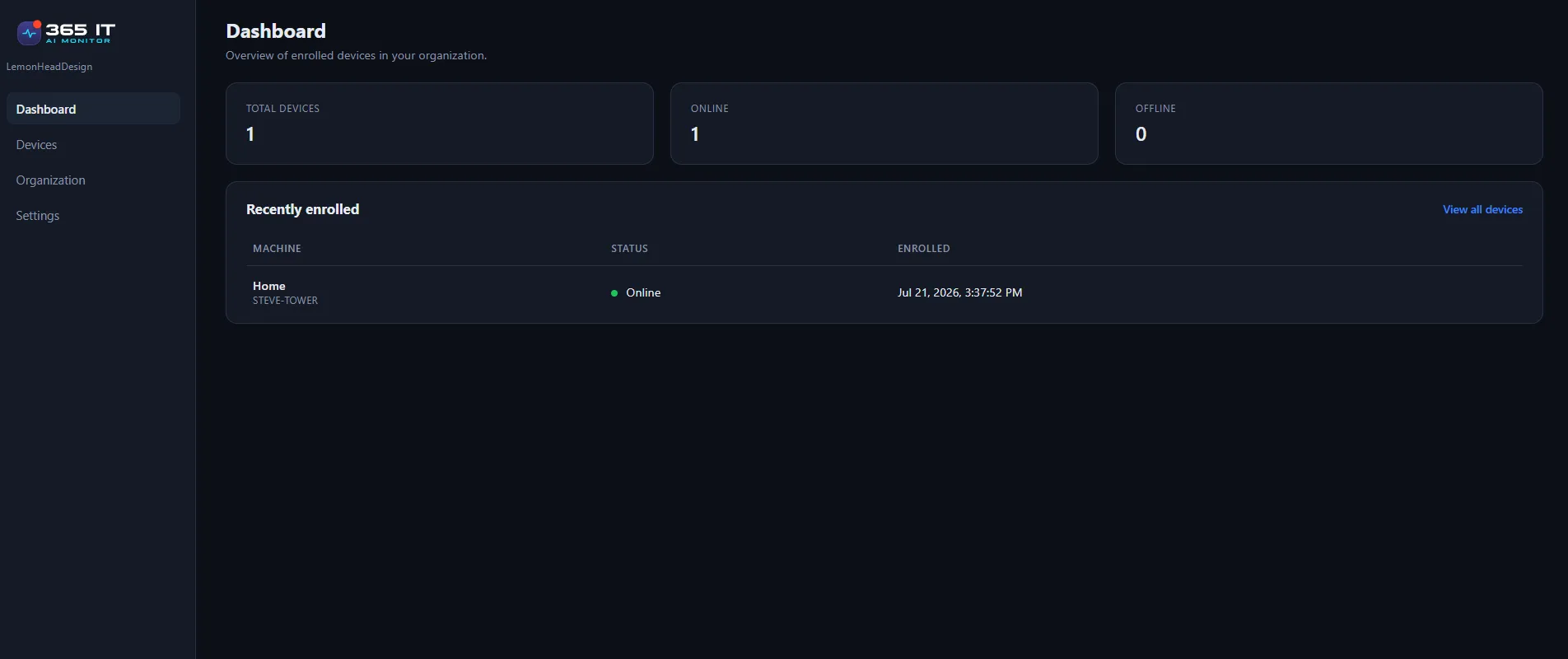
Every computer, with its status and when it was last seen.
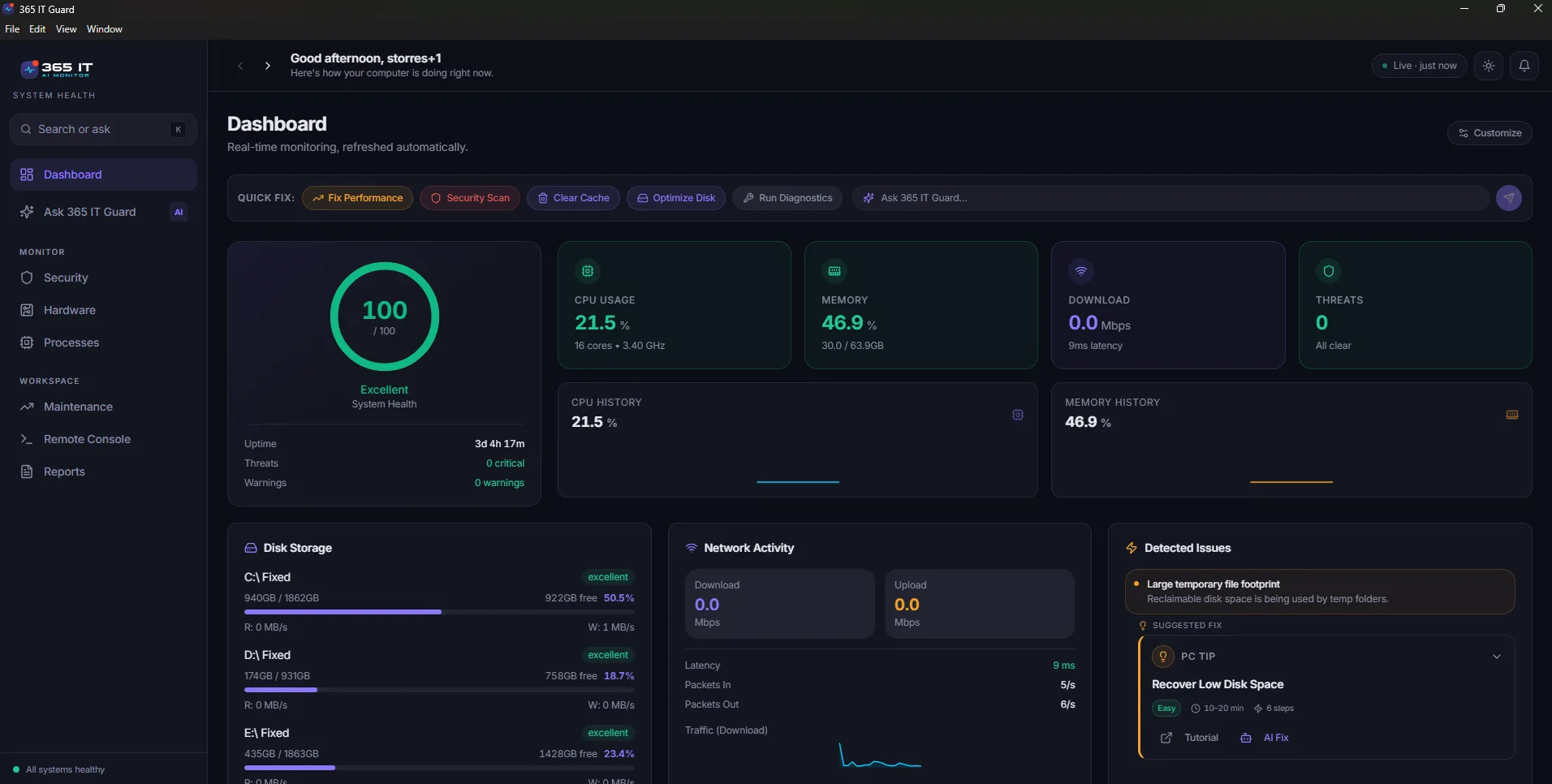
How one computer is doing, with the fixes and the assistant built in.
04How it works
Three steps to your first computer.
The same three whether it is your own PC or the first in your office.
01
Download and install
Run the Windows installer. No server, and no IT person.
02
Create your account
You confirm your email when you create your account. Each time you sign in, we text a one-time code to your phone.
03
See what it finds
The computer appears with its health score and protection status. Add the next one with your signup code.
The same in both cases.
One small app, one set of rules about what it can and cannot do.
- Setup
- MinutesFrom install to appearing in your list
- Control
- You click itEvery fix is clicked by the person at the computer
- Security
- Texted codeA one-time code each time you sign in
- Windows
- 10 and 11One platform, done properly
Scope
What it is, and what it is not.
What it is
- A small app on each Windows computer that fixes everyday problems with one click
- One place to see every computer, what needs attention, and whether it is protected
- An assistant that answers in plain language, about that computer
What it is not
- Not an RMM. It does not install Windows updates or run scripts
- Not antivirus. It checks your antivirus; it doesn’t replace it
- Not remote control. Every fix is clicked by the person at the computer
If you already have IT, see how this sits alongside it.
We are in Beta.
There is no wall of reviews yet, and we are not going to invent one. The roadmap lists what is not built yet, in plain language.
Install it on one computer and decide from there. What is shipping next.
Start with one computer.
Install it, see what it finds, and decide from there.